Is your store leaking revenue?
Find out exactly where you're losing sales — takes 2 minutes.
The exit page most subscription brands build last is the one that decides whether revenue compounds or evaporates
What Is a Subscription Cancellation Flow?
Every subscriber leaves eventually.
A subscription cancellation flow is the sequence of screens, offers, and confirmations a customer sees when they try to end a recurring subscription. A well-built flow surfaces pause and discount options before processing the cancellation, and separates voluntary cancellations from involuntary ones caused by failed payments. Subscription platforms like Recharge, Skio, and Loop build this flow as a configurable step, not a single "cancel" button.
Most Shopify merchants treat the cancel flow as an afterthought. They build a beautiful signup experience, run it through three rounds of CRO testing, then bolt a bare "cancel subscription" link onto the customer portal.
That's backwards. The cancellation flow is the last conversion event in the customer lifecycle, and it's the one most likely to be left untested, reviewed, or improved on purpose.
Why Does Your Cancellation Flow Matter More Than Your Signup Flow?
Acquisition is expensive. Retention is cheap by comparison.
A subscription cancellation flow matters more than signup because every subscriber who cancels has to be replaced at full acquisition cost, while a saved subscriber costs almost nothing to keep. Stores that insert a pause or discount step before cancellation typically retain a meaningful share of customers who would otherwise have churned outright, based on patterns reported across subscription retention platforms.
Here's the math most founders skip. If your paid acquisition cost per subscriber sits in the $20-$60 range (typical for Shopify DTC brands running Meta or Google ads), every unsaved cancellation is a sunk cost with no second chance at payback.
A cancellation flow that offers a pause, a discount, or a plan swap before the final "yes, cancel" click gives you one more shot at that payback. Skip it, and you're paying full acquisition price to lose the customer a second time.
There's a second cost that's easy to miss: the exit experience is the last impression a subscriber has of your brand. A frustrating, dark-pattern cancel flow doesn't just lose the sale. It kills the chance of a win-back later and invites a chargeback or a public complaint.
What Are the Core Steps of a Subscription Cancellation Flow?
A good flow has a predictable shape.
The core steps of a subscription cancellation flow are: intent capture (why are you leaving), a targeted save offer matched to that reason, a pause or frequency-change alternative, and a clear, one-click final confirmation. Skipping the intent-capture step is the most common mistake, because it means every subscriber gets the same generic save offer regardless of their actual reason for leaving.

Build it in this order:
- Cancel trigger. The customer clicks "manage subscription" or "cancel" from their account portal or a transactional email link. This needs to work without a support ticket. Forcing a phone call or live chat to cancel is the single fastest way to generate a chargeback.
- Reason capture. A short, single-question survey: too expensive, don't need it anymore, found an alternative, product issue, or payment problem. This single data point is what makes every later step relevant instead of generic.
- Reason-matched save offer. "Too expensive" gets a discount or a smaller plan. "Don't need it as often" gets a frequency change (monthly to quarterly). "Found an alternative" gets a direct ask for what's missing, which doubles as product feedback.
- Pause instead of cancel. A 30, 60, or 90-day pause keeps the subscription contract alive without charging the customer. This converts a permanent loss into a temporary one, and it's the single highest-leverage screen in the whole flow.
- Final confirmation. If none of the offers land, let the customer cancel in one click. Don't add a second "are you sure" screen loaded with guilt copy. That pattern reads as a dark pattern, and it damages trust more than it saves subscribers.
How Do You Add Retention Offers Without Feeling Pushy?
The line between "helpful offer" and "annoying obstacle" is thin.
A retention offer avoids feeling pushy when it is specific to the stated cancellation reason, limited to one offer screen, and never blocks the customer from reaching the final cancel button. Subscription brands that match the offer to the reason report meaningfully higher save rates than brands showing one generic discount to every canceling customer.

Three rules keep a save offer from backfiring:
- One offer, not three. Showing a discount, then a pause, then a downgrade in sequence reads as desperation. Pick the single best-fit offer for the stated reason and lead with it.
- Real stakes, not fake urgency. "This offer expires in 10 minutes" on a cancellation screen reads as manipulative, because the customer is already mid-exit. Use plain language instead: "Here's 20% off your next 3 orders if you'd like to stay."
- An honest exit path. The cancel button must always be visibly reachable. Hiding it behind nested menus or disguising it as a lighter shade of gray is the fastest way to generate a support complaint or a chargeback dispute.
Does your subscription cancellation flow actually save subscribers, or just annoy them on the way out? Find out where your store is leaking recurring revenue. Take the free Revenue Score. 3 minutes. Free. No pitch.
How Do You Handle Involuntary Churn From Failed Payments?
Not every cancellation is a choice.
Involuntary churn happens when a subscription payment fails due to an expired card, insufficient funds, or a bank decline, and no human ever chose to cancel. Dunning (automated retry and follow-up emails) recovers a meaningful share of these failed payments if retries are spread over 5-10 days rather than attempted all at once. Left unmanaged, involuntary churn can account for a large share of total subscription cancellations.
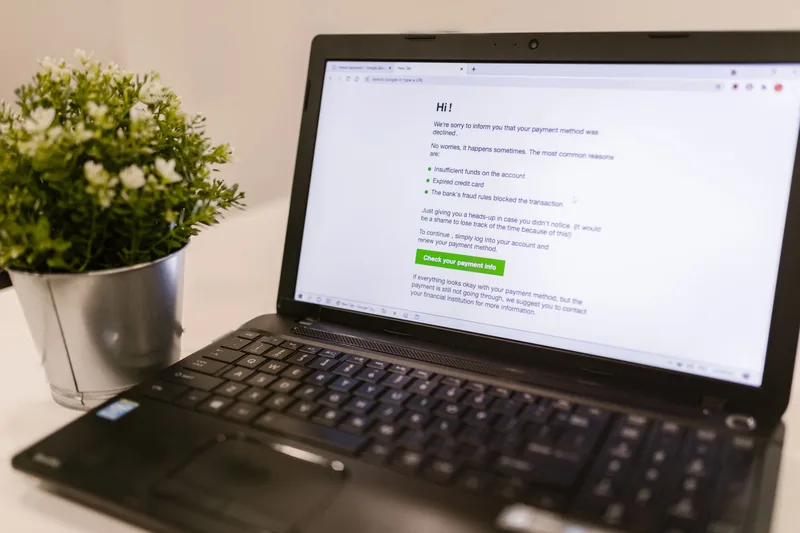
Involuntary churn deserves its own flow, separate from voluntary cancellation, because the fix is different:
- Smart retry timing. Retrying a declined card immediately rarely works. Spacing retries across 5-10 days matches typical payroll and bank-balance cycles, giving the card a better chance of clearing on a later attempt.
- Card-updater integrations. Networks like Visa and Mastercard offer account-updater services that silently refresh expired card numbers behind the scenes, through your payment processor, before a single retry even runs.
- A dedicated "update payment" email sequence, distinct from your regular marketing calendar, with a direct link to update the card on file. See our breakdown of ecommerce email automation for sequence timing that doesn't read as spam.
The practical upshot: before you spend a dollar improving your voluntary cancel flow, check what share of your churn is actually involuntary. Fixing a broken dunning sequence is almost always the cheaper win.
What Does a Fair, Low-Friction Cancellation Flow Look Like?
Regulators and customers are converging on the same standard.
A fair cancellation flow lets a customer cancel in roughly the same number of steps it took to sign up, without requiring a phone call, a support ticket, or a mandatory retention conversation. Baymard Institute's checkout usability research found that confusing, multi-step flows are consistently one of the top drivers of user frustration in digital commerce, a pattern that applies directly to cancellation as much as to checkout.
The "cancel should be as easy as signup" standard shows up across consumer protection frameworks in multiple markets, including the US and EU, and it's becoming the baseline customers expect regardless of what any single regulation requires. Building to that standard now avoids a scramble later, and it costs nothing more than removing steps you've already built.
| Cancellation Reason | Best-Fit Save Tactic | Typical Save Rate Range* |
|---|---|---|
| Too expensive | Discount or smaller plan | 15-30% |
| Don't need it as often | Frequency change (pause/skip) | 20-35% |
| Found an alternative | Direct feedback ask + match offer | 5-15% |
| Payment problem | Dunning / card update flow | 30-50% recovered |
| No reason given | Generic pause offer | 5-10% |
*Ranges reflect patterns reported by subscription retention platforms including Recharge, Skio, and Loop, and vary by vertical and price point. Treat these as planning ranges, not guarantees.
Which Tools Power a Subscription Cancellation Flow on Shopify?
You don't need to build this from scratch.
Shopify subscription brands typically run their cancellation flow through a dedicated subscription app rather than custom code, because these apps include reason-capture surveys, save offers, and dunning as built-in features. Shopify's own subscriptions documentation confirms the platform supports first-party and third-party subscription apps that manage the full purchase-option lifecycle, including cancellation.

| Platform | Reason-Capture Survey | Save Offers | Dunning / Failed-Payment Recovery |
|---|---|---|---|
| Recharge | Yes | Yes (native) | Yes |
| Skio | Yes | Yes (native) | Yes |
| Loop Subscriptions | Yes | Yes (native) | Yes |
| Shopify Subscriptions (first-party) | Limited | Limited | Via payment processor |
Feature availability per each platform's published documentation at time of writing; confirm current plan tiers directly with the vendor before committing.
Whichever platform you run, the cancellation flow configuration lives in the same place as your subscription ecommerce model setup, not bolted on separately. If you're still deciding between a full subscription model and a one-time purchase catalog, start there before building the cancel flow around it.
Frequently Asked Questions
What is a subscription cancellation flow?
A subscription cancellation flow is the step-by-step screen sequence a customer sees when ending a recurring subscription. It typically includes reason capture, a targeted save offer, a pause alternative, and a final confirmation. Most Shopify subscription apps, including Recharge and Skio, include this as a configurable feature.
How do you reduce subscription cancellations?
Reduce cancellations by matching a save offer to the customer's stated reason for leaving, offering a pause instead of a full cancel, and fixing involuntary churn from failed payments through dunning. Brands that separate voluntary and involuntary churn typically see the biggest gains, since failed-payment recovery often has the highest save rate of any tactic.
What is the difference between voluntary and involuntary churn?
Voluntary churn happens when a customer actively chooses to cancel. Involuntary churn happens when a subscription payment fails due to an expired card or decline, with no active cancellation decision made. Involuntary churn is typically addressed through automated retry sequences (dunning) rather than retention offers.
Should a cancellation flow require a phone call?
No. Requiring a phone call or support ticket to cancel increases chargeback risk and customer frustration, and runs against the "cancel as easy as signup" standard now expected across major consumer markets. A self-serve, one-click final cancel step should always be reachable in the flow.
Which Shopify app is best for building a cancellation flow?
Recharge, Skio, and Loop Subscriptions all include native cancellation flow builders with reason capture, save offers, and dunning. The right choice depends on your existing tech stack and the complexity of your subscription catalog, so compare current feature sets directly with each vendor before switching.
Keep Reading

Free Download
We audited 10 Shopify stores doing $1M–$20M. Here are the 15 leaks every one had.
Real screenshots (names blurred). Most operators have 8 of the 15 and don't know it.
From 10 audits across SG, MY, AE — fashion, beauty, electronics, food.
PDF in your inbox in 30 seconds. 1 email. No follow-up unless you ask.